Retro Wave Chrome Editable Text Effect: A Modern Designer’s Guide
In the ever-evolving landscape of digital design, trends often circle back with a fresh perspective. The resurgence of 80s aesthetics, characterized by neon grids, sunset gradients, and metallic finishes, has found a powerful new expression in the Retro Wave Chrome Editable Text Effect. This specific style is not merely a nostalgic nod to the past; it is a sophisticated tool for modern creators who wish to blend vintage charm with contemporary polish. Whether you are designing for social media, print publications, or web interfaces, understanding how to leverage this effect can significantly elevate your visual communication.
Understanding the Aesthetic Appeal
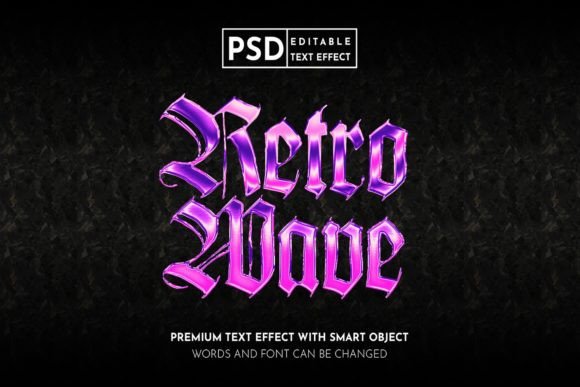
The term "Retro Wave" evokes images of synth-wave music covers, arcade cabinets, and futuristic cityscapes from a decade that never quite existed. When combined with a chrome finish, the aesthetic gains a layer of depth and realism that flat colors cannot achieve. The Retro Wave Chrome Editable Text Effect utilizes complex lighting, reflections, and gradient maps to simulate the look of polished metal under neon lights. This creates a striking contrast that immediately captures attention.
For designers, the appeal lies in the balance between complexity and usability. Traditionally, creating realistic chrome text required hours of manual layer styling, masking, and painting highlights. However, modern resources have streamlined this process. By using a pre-built Smart Object structure, the heavy lifting is done for you. You simply double-click the smart object layer, type your desired text, save, and watch the effect apply automatically. This efficiency allows creators to focus on composition and messaging rather than technical execution.
Key Features and Technical Characteristics
To fully appreciate the value of this asset, it is essential to understand its technical foundation. The Retro Wave Chrome Editable Text Effect is typically distributed as a Photoshop PSD file. Here are the core characteristics that make it a valuable addition to any designer’s toolkit:
- Smart Object Integration: The text is contained within a Smart Object, ensuring that all effects remain non-destructive. You can edit the text content at any time without losing the quality of the chrome effect.
- RGB Color Mode: Designed specifically for digital displays, the color mode is set to RGB. This ensures that the vibrant neons and metallic shines appear exactly as intended on screens, from smartphones to large monitors.
- Fully Customizable Elements: Beyond just the text, many versions of this effect allow you to tweak background elements, glow intensity, and color hues. This flexibility means the effect can be adapted to match various brand identities.
- Included File Formats: The main folder usually includes both the layered PSD file for editing and high-resolution JPG files for quick previewing or immediate use if no edits are needed.
Practical Applications Across Media
The versatility of the Retro Wave Chrome Editable Text Effect extends far beyond simple graphic experiments. Its bold nature makes it suitable for a wide range of professional applications. Let us explore where this effect shines brightest.
Social Media Promotion
In the crowded feeds of Instagram, Twitter, and Facebook, stopping the scroll is the primary goal. The high-contrast nature of chrome text against dark, retro backgrounds creates an instant visual hook. For Instagram stories or posts, this effect can be used to highlight sale announcements, event dates, or motivational quotes. The metallic sheen reflects light in a way that mimics video content, drawing the eye even in static images. On Twitter, where brevity is key, a striking header image using this text effect can reinforce personal branding or promote a new thread.
Print and Publication Design
While designed in RGB for screens, the high resolution of these PSD files allows for effective use in print media as well. Flyers, posters, and magazine covers benefit from the tactile illusion of chrome. Imagine a concert poster for a synth-pop band; the title rendered in glossy, reflective chrome instantly communicates the genre and energy of the event. Similarly, event papers and promotional brochures can use this effect for headlines to create a sense of premium quality and excitement. It is important, however, to convert the final file to CMYK if sending to a professional printer, keeping in mind that some neon vibrancy may shift in the printing process.
Web Design and Digital Headers
Web designers can utilize this effect for hero sections, landing page headers, or call-to-action buttons. The Retro Wave Chrome Editable Text Effect adds a layer of sophistication to tech startups, gaming websites, or creative portfolios. Because the text is editable, it can be quickly adapted for different campaigns or seasonal updates without redesigning the entire layout. The key is to ensure the text remains legible against the background, balancing the shine with readability.
Evaluating Suitability for Your Project
Not every project benefits from a retro chrome aesthetic. Before integrating this effect, consider the following factors to ensure it aligns with your goals.
- Brand Identity: Does your brand embrace boldness, nostalgia, or futurism? If your brand is minimalist or corporate traditional, this effect might clash. However, for lifestyle, entertainment, or tech brands, it can be a perfect fit.
- Target Audience: Younger demographics and millennials often resonate with retro wave aesthetics due to cultural nostalgia. If your audience skews older or prefers conservative designs, a subtler approach might be necessary.
- Context of Use: In information-heavy documents, decorative text can be distracting. Reserve the Retro Wave Chrome Editable Text Effect for headlines, titles, or standalone graphics where the visual impact is the primary objective.
Strengths and Limitations
Like any design tool, this effect has its strengths and considerations. On the positive side, it offers speed and consistency. What might take an hour to create from scratch can be achieved in seconds. The professional quality of the lighting and reflections ensures a polished look that amateurs might struggle to replicate manually. Furthermore, the ability to easily edit text means you can iterate quickly during the client feedback phase.
However, there are limitations. Since the effect is pre-styled, it may lack uniqueness if overused. Many designers may have access to similar assets, so relying solely on the default settings can result in generic-looking work. To mitigate this, users should take advantage of the customizable features. Adjusting the hue, saturation, and background elements can help tailor the effect to be more distinct. Additionally, because it is optimized for RGB, users must be cautious when transitioning to print media, as mentioned earlier.
Tips for Maximizing Impact
To get the most out of your Retro Wave Chrome Editable Text Effect, consider these practical tips:
- Contrast is Key: Ensure your background provides enough contrast for the chrome text to pop. Dark, gradient backgrounds often work best to highlight the metallic reflections.
- Keep it Short: Complex effects are best suited for short phrases or single words. Long paragraphs in chrome text can become difficult to read and visually overwhelming.
- Experiment with Colors: While the default might be silver or gold, do not hesitate to shift the color balance. Cyan, magenta, and purple tones enhance the retro wave vibe significantly.
- Layering: Combine the text effect with other elements like grid lines, stars, or geometric shapes to create a cohesive composition that tells a story.
Conclusion
The Retro Wave Chrome Editable Text Effect is more than just a trendy filter; it is a versatile design asset that bridges the gap between nostalgic aesthetics and modern digital needs. By offering ease of use through Smart Objects and high-quality RGB output, it empowers creators to produce professional-grade visuals efficiently. Whether you are promoting an event on Instagram, designing a magazine cover, or updating your website’s hero section, this tool provides the visual punch needed to stand out. As with any design element, success lies in thoughtful application. By understanding its features, respecting its limitations, and customizing it to fit your unique vision, you can harness the power of retro chrome to create compelling, memorable designs.
For those looking to expand their creative repertoire, downloading a high-quality PSD package is a small investment with significant returns. Remember, the goal is not just to use the effect, but to adapt it. Make it yours. Change the text, tweak the colors, and let the Retro Wave Chrome Editable Text Effect serve as a foundation for your next great design project.