Neon Light Text Effect: Editable Design
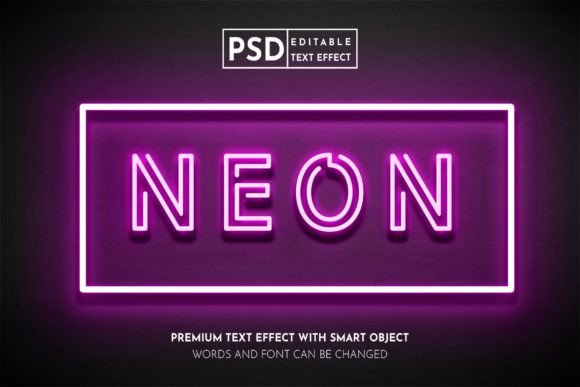
In the saturated landscape of digital marketing and visual communication, capturing attention within the first few seconds is not just an advantage; it is a necessity. The Neon Light Text Effect has emerged as a powerful tool for designers and content creators who need to cut through the noise. This aesthetic does more than just mimic the glow of vintage signage; it evokes nostalgia, energy, and modernity simultaneously. Whether you are designing a social media post for Instagram or laying out a high-impact flyer for a local event, understanding how to leverage this effect can transform ordinary typography into a focal point that demands engagement.
What makes this specific approach to neon design particularly valuable is its adaptability. Unlike static raster images that lose quality when resized or cannot be altered without starting from scratch, a fully editable vector-based neon text effect offers unparalleled flexibility. This means you are not locked into a single phrase or color scheme. Instead, you have a dynamic template that responds to your creative needs, allowing for rapid iteration and customization across various platforms and print mediums.
The Versatility of Vector-Based Neon Designs
When we discuss professional design assets, the distinction between raster and vector formats is critical. Raster images, such as standard JPEGs, are composed of pixels. When you enlarge them, they become blurry and pixelated. Vector files, typically saved as EPS or AI formats, use mathematical equations to define shapes and lines. This ensures that your neon text remains crisp and sharp whether it is displayed on a small mobile screen or printed on a large-format poster.
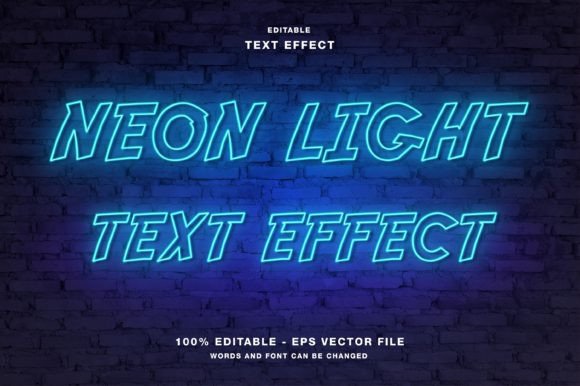
The editable nature of this Neon Light Text Effect means that every element—from the glow intensity to the tube thickness—is under your control. For a graphic designer working on a brand identity, this allows for precise alignment with corporate color guidelines. For a social media manager, it means the ability to quickly swap out text for daily promotions without needing advanced illustration skills. The inclusion of both EPS and JPG files in the main folder provides a complete workflow solution: use the EPS for editing and high-resolution output, and the JPG for quick previews or web uploads where file size is a concern.
Strategic Applications Across Digital Platforms
Digital spaces thrive on visual immediacy. On platforms like Instagram, Twitter, and Facebook, users scroll rapidly through feeds. A well-executed neon text effect acts as a visual anchor. Here is how different creators can apply this style effectively:
- Social Media Promotions: Use bright, contrasting neon colors against dark backgrounds to highlight limited-time offers or flash sales. The glow effect naturally draws the eye to the center of the image, ensuring your call-to-action is seen.
- YouTube Thumbnails: High-contrast neon text stands out even at small sizes. Using this effect for key words in your thumbnail can increase click-through rates by making the video topic instantly recognizable.
- Website Headers: For landing pages, a neon headline can set a modern, energetic tone. Since the text effect uses RGB color mode, it is optimized for screens, ensuring the colors appear vibrant and true to life on monitors and smartphones.
It is important to remember that while neon is eye-catching, it should not overwhelm the message. Keep the text concise. Use the effect for headlines or short phrases rather than long paragraphs. This maintains readability and ensures the design feels intentional rather than chaotic.
Print Media and Physical Marketing Materials
While neon is inherently associated with light and screens, its application in print media is equally compelling when handled correctly. The key lies in understanding the limitations and opportunities of the medium. When designing flyers, posters, magazines, or event papers, the goal is to replicate the illusion of light using ink.
For publication promotion, such as magazine covers or event flyers, a neon text effect can convey a sense of nightlife, technology, or retro cool. However, because print uses CMYK color mode and screens use RGB, there can be discrepancies in color vibrancy. To mitigate this, start with the RGB-based editable template to achieve the desired look, but always consult with your printer regarding color profiles. Many modern digital printers can handle vibrant spot colors that approximate the neon glow effectively.
Consider the context of the physical item. A poster for a music festival benefits from the raw energy of jagged, bright neon letters. In contrast, a magazine feature on modern architecture might use a sleeker, thinner neon font to suggest sophistication and precision. The editable nature of the template allows you to adjust the weight and style of the "tubes" to match the tone of your publication.
Customization for Brand Consistency
One of the greatest strengths of using an editable Neon Light Text Effect is the ability to maintain brand consistency while experimenting with trends. Many businesses hesitate to adopt trendy styles because they fear losing their unique identity. With a customizable template, you can adjust the hue to match your brand’s primary colors. If your brand uses a specific shade of blue, you can tweak the neon glow to align perfectly with that hex code.
Furthermore, you can modify the background elements. Neon text often looks best against dark or textured backgrounds. You can replace the default background with your own branded patterns, gradients, or images. This ensures that while the style is contemporary, the final output is unmistakably yours. This level of customization is essential for freelancers and small business owners who need to produce high-quality materials quickly without hiring a dedicated illustrator for every project.
Practical Tips for Effective Implementation
To get the most out of this design asset, consider these practical recommendations:
- Contrast is Key: Ensure there is sufficient contrast between the neon text and the background. Light neon on a light background will disappear. Dark backgrounds, especially deep blacks or navy blues, make the glow effect pop.
- Legibility First: Some neon fonts are highly stylized. Always test your text for readability. If the audience cannot read the message within two seconds, the design has failed, regardless of how beautiful the glow is.
- Layer Management: When editing the EPS file in Illustrator, keep your layers organized. Separate the text, the glow effects, and the background into distinct layers. This makes future edits faster and prevents accidental changes to other elements.
- Contextual Relevance: Ask yourself if the neon aesthetic fits the message. It works wonderfully for events, tech products, fashion, and entertainment. It may be less suitable for conservative corporate reports or legal documents. Match the style to the subject matter.
By integrating this editable neon text effect into your design toolkit, you gain a versatile resource that bridges the gap between artistic flair and functional communication. It empowers you to create visually striking content that resonates with audiences across both digital and physical channels. Whether you are a seasoned designer looking to speed up your workflow or a hobbyist eager to add professional polish to your projects, this tool offers the freedom to create, customize, and captivate.
Ultimately, the value of any design element lies in its ability to enhance the message it carries. The neon light effect does this by adding dimension, energy, and focus. By mastering its application through editable templates, you ensure that your creative vision is never limited by technical constraints, allowing your ideas to shine as brightly as the text itself.