Integrating Hand-Painted Butterflies Clipart PNG into Your Creative Workflow
In the fast-paced world of digital design and physical crafting, finding assets that balance high aesthetic value with technical reliability is a constant challenge. Many creators struggle to bridge the gap between mass-produced, sterile graphics and custom, time-intensive illustrations. This is where a curated collection of Butterflies Clipart PNG files becomes an essential resource. Specifically, sets featuring hand-painted acrylic drawings offer a unique texture and organic feel that vector graphics often lack. Understanding how to integrate these high-resolution assets into your existing processes can significantly enhance the quality of your output while streamlining production timelines.
The Value of Hand-Painted Acrylic Textures in Digital Design
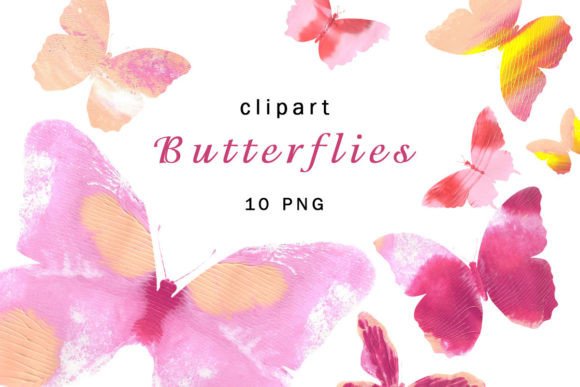
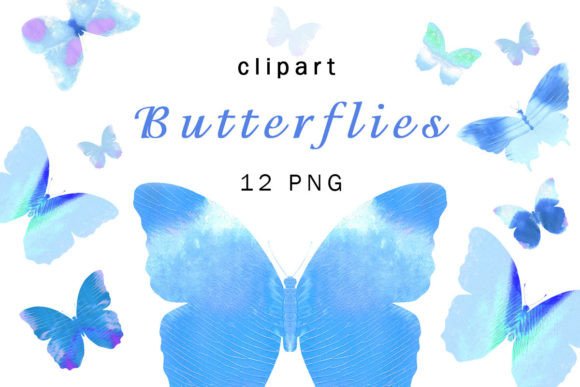
When selecting visual elements for any project, the medium matters. Standard digital illustrations can sometimes appear flat or overly perfect, lacking the subtle imperfections that give art its human touch. The Hand Painted drawing Acrylic butterflies clipart described here provides a distinct advantage: authenticity. Each element is derived from actual acrylic paint applications, capturing the brushstrokes, color blending, and depth that only traditional media can achieve.
For professionals such as graphic designers, marketers, and small business owners, this distinction is crucial. It allows for the creation of branding materials that feel bespoke and warm. When you incorporate these textures into wedding invitations, greeting cards, or blog headers, you are not just adding an image; you are adding a layer of tactile realism. This approach aligns with current design trends that favor organic shapes and natural motifs over rigid geometric patterns.
Technical Specifications and File Compatibility
Before integrating any asset into a workflow, understanding its technical foundation is vital for efficiency. This specific pack includes 12 RGB PNG files, each sized at 2000 pixels by 2000 pixels with a resolution of 300 DPI. These specifications are not arbitrary; they are designed to ensure versatility across both digital and print mediums.
- High Resolution (300 DPI): This density is the industry standard for professional printing. It ensures that when you print stickers, posters, or fabric designs, the edges remain crisp and the colors vibrant, without pixelation.
- RGB Color Mode: Ideal for web design, social media content, and digital displays. While CMYK is preferred for some offset printing processes, modern digital printers handle RGB files exceptionally well, especially for home-based or small-batch production.
- PNG Format with Transparency: The transparent background is perhaps the most critical feature for workflow integration. It eliminates the need for time-consuming background removal tasks, allowing you to drag and drop elements directly into your compositions.
By starting with files that meet these standards, you reduce the pre-production phase of your projects. You do not need to upscale low-quality images or manually cut out subjects, which preserves the integrity of the original hand-painted artwork.
Workflow Integration for Print and Physical Products
For entrepreneurs and hobbyists involved in creating physical goods, such as nursery decor, clothing, or stationery, the implementation of these clipart files follows a clear process. The key is preparation and compatibility with your printing method.
Preparing for Fabric and Paper Printing
If you are designing for fabric printing, such as t-shirts or tote bags, the acrylic texture of the butterflies adds a sophisticated, artisanal look. Begin by setting up your design canvas in software like Adobe Photoshop, Illustrator, or Canva. Import the PNG file and adjust the size to fit your garment template. Because the files are 2000x2000 pixels, you have ample room to scale them down for pocket logos or up for large back prints without losing detail.
For paper products like wedding invitations or greeting cards, consider the weight and texture of the paper stock. The organic nature of the acrylic paint complements textured papers, such as linen or cotton blends. When arranging multiple butterfly elements, use layers to create depth. Place larger, more opaque butterflies in the foreground and smaller, slightly transparent ones in the background to mimic a natural swarm. This technique adds visual interest and guides the viewer’s eye through the design.
Decoupage and Papercraft Applications
DIY enthusiasts utilizing these images for decoupage or scrapbooking should focus on color harmony. Since the butterflies are hand-painted, they likely contain subtle variations in hue. Test print a small section on your chosen paper to ensure the colors match your project’s palette. Cutting out these printed images requires precision tools, but the high contrast of the acrylic strokes against the transparent background makes it easier to identify edges if you choose to trim them manually.
Digital Implementation for Web and Branding
Beyond physical products, these assets are highly effective in digital environments. Bloggers, web designers, and social media managers can use the Butterflies Clipart PNG to break up text-heavy layouts or add decorative flair to digital newsletters.
When using these images for web design, file size optimization is a necessary step. While the original 300 DPI files are perfect for print, they may be too large for quick web loading. Use image compression tools to reduce the file size while maintaining visual quality. This ensures that your website remains fast and user-friendly, which is critical for SEO and user retention.
For branding purposes, such as logos or photo overlays, consistency is key. Select one or two butterfly designs from the set to serve as recurring visual motifs. Using the same elements across your Instagram posts, email signatures, and website banners creates a cohesive brand identity. The hand-painted style conveys creativity and attention to detail, traits that resonate well with audiences in lifestyle, education, and wellness sectors.
Organizing Assets for Long-Term Efficiency
To maximize the utility of this 12-file pack, establish a systematic organization method. Do not leave the files in your downloads folder. Create a dedicated directory within your digital asset library, labeled clearly with descriptors such as "Acrylic_Butterflies_300DPI." Within this folder, you might create subfolders for "Print_Ready" and "Web_Optimized" if you plan to create different versions for various uses.
Maintaining an organized library saves time during future projects. When a client requests a nature-themed design or you need a quick embellishment for a personal project, you can retrieve these high-quality elements instantly. This readiness supports a proactive rather than reactive workflow, allowing you to meet deadlines with less stress.
Quality Control and Best Practices
Even with high-quality source files, final output depends on your execution. Always preview your designs at 100% zoom to check for any unintended artifacts or alignment issues. If you are combining the butterfly clipart with other elements, ensure that the lighting and perspective are consistent. For instance, if your background image has a strong light source from the left, consider adding a subtle shadow to the butterfly to ground it in the scene.
Additionally, respect the licensing terms associated with instant download packs. Most commercial-use licenses allow for unlimited projects, but it is wise to verify if there are restrictions on reselling the raw digital files. Using these assets as part of a larger, transformed design is generally the intended and safest practice.
In conclusion, incorporating Hand Painted drawing Acrylic butterflies clipart into your creative toolkit offers a blend of artistic charm and technical practicality. Whether you are decorating a nursery, designing a wedding suite, or enhancing a digital blog, these high-resolution PNGs provide the flexibility needed for diverse applications. By understanding their specifications, organizing them effectively, and applying them with intention, you can elevate the quality of your work and streamline your creative process.