Evaluating the Pitch Deck Google Slides Template for Business Presentations
Creating a compelling narrative for investors or stakeholders is one of the most critical tasks for entrepreneurs and business professionals. The visual component of this narrative often determines whether the audience remains engaged or loses interest. A Pitch Deck Google Slides Template offers a structured solution to this challenge, providing a pre-designed framework that balances aesthetic appeal with functional clarity. This article explores the features, benefits, and practical considerations of using such a template, helping you determine if it aligns with your presentation goals.
Understanding the Template Structure and Design
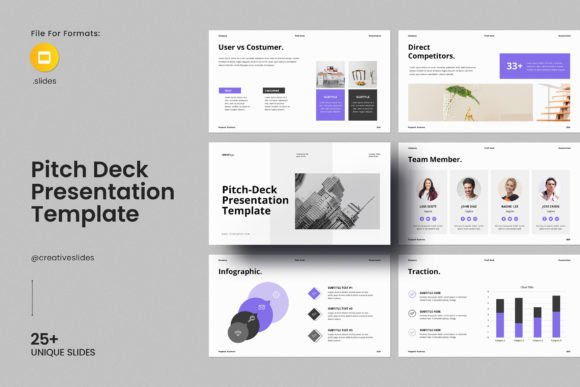
At its core, this template is designed to be a comprehensive tool for business planning and pitching. It moves beyond simple text placeholders by integrating specialized infographic elements, charts, graphs, and maps. These visual aids are essential for translating complex data into digestible insights, a key requirement for effective business communication. The inclusion of device showcases allows presenters to display mobile apps or web interfaces realistically, adding a layer of professionalism that static screenshots often lack.
The template consists of 33 slides in total, covering a wide range of common presentation needs. From executive summaries and problem statements to financial projections and team introductions, the structure guides the user through a logical flow. With 20 color themes available, users can adapt the visual identity to match their brand guidelines without needing advanced design skills. The use of free fonts ensures that the presentation remains consistent across different devices and operating systems, eliminating compatibility issues that often arise with proprietary typography.
Accessibility and Ease of Use
One of the primary advantages of this Pitch Deck Google Slides Template is its accessibility. It is explicitly designed for both technical and non-technical users, requiring no prior knowledge of graphic design software. The editing process relies on intuitive drag-and-drop functionality, allowing users to replace images and adjust layouts effortlessly. This ease of use is particularly beneficial for startups and small businesses that may not have dedicated design resources.
The template is optimized for online editing via Google Slides, which means it can be accessed and modified from any web browser. This cloud-based approach facilitates collaboration, enabling multiple team members to work on the deck simultaneously. Additionally, the template is compatible with other formats, offering flexibility for users who prefer different applications. The 16:9 Full HD ratio (1920x1080px) ensures that the presentation looks sharp on modern screens, projectors, and video conferencing platforms.
Key Features and Customization Options
Customization is a critical factor when selecting a presentation template. This template includes a pack of over 4000 icons, providing a vast library of visual symbols to enhance clarity and engagement. All graphic elements are resizable and editable, giving users control over the final appearance. While the template includes placeholder images, it is important to note that these are not included in the download; users must supply their own high-quality visuals. However, the easy drag-and-drop feature simplifies the process of inserting custom images.
The versatility of the template allows it to be used across various industries. Whether you are presenting a tech startup, a marketing strategy, or a financial report, the modular design can be adapted to suit specific needs. The inclusion of charts and graphs is particularly useful for data-driven presentations, allowing for clear visualization of trends and metrics. Support services are also provided, with skilled designers available to assist with inquiries, ensuring that users can resolve any technical issues quickly.
Benefits and Practical Considerations
Using a pre-built template offers several tangible benefits. First, it significantly reduces the time required to create a professional-looking presentation. Instead of starting from scratch, users can focus on refining their content and message. Second, the consistent design language helps maintain audience attention and reinforces credibility. A well-designed deck signals professionalism and preparedness, which can influence investor perception.
However, there are tradeoffs to consider. While the template provides a strong foundation, it may require adjustment to fully align with unique brand identities. Users must ensure that their custom images and data are of high quality, as the template itself cannot compensate for poor content. Additionally, while the drag-and-drop interface is user-friendly, achieving a highly customized look may still require some attention to detail regarding alignment and spacing.
When This Template Is a Strong Fit
This Pitch Deck Google Slides Template is an excellent choice for entrepreneurs, consultants, and business developers who need to create a polished presentation quickly. It is particularly suitable for those who value efficiency and do not have extensive design experience. Startups preparing for seed funding rounds will find the structured slides helpful for organizing their pitch logically. Similarly, corporate teams working on internal reports or client proposals can benefit from the professional aesthetic and data visualization tools.
If your goal is to present complex information in a clear, visually appealing manner without investing significant time in design, this template meets those needs effectively. The availability of multiple color themes and icons allows for sufficient customization to make the deck feel unique while maintaining a cohesive look.
When to Consider Alternatives
Despite its advantages, this template may not be the best fit for every situation. If your organization has strict brand guidelines that require specific custom fonts, intricate animations, or unique layout structures not supported by standard slide formats, a bespoke design solution might be necessary. Additionally, if you require advanced interactive elements or dynamic data connections that go beyond static charts, specialized presentation software or custom development may be more appropriate.
Users who already possess advanced design skills and prefer complete creative control may find the template restrictive. In such cases, starting from a blank canvas or using more flexible design tools like Adobe Illustrator or InDesign could offer greater freedom. However, for most business contexts, the balance of structure and flexibility provided by this template is sufficient.
Making the Right Decision
Choosing the right presentation tool depends on your specific requirements, timeline, and resources. Evaluate your current needs: Do you need a quick, professional solution? Are you comfortable with basic editing tools? Does your content rely heavily on data visualization? If the answers are yes, this Pitch Deck Google Slides Template is a viable option. Consider downloading the help file to review the font links and support options before committing. By understanding the capabilities and limitations of the template, you can make an informed decision that supports your communication goals.
Ultimately, the effectiveness of any presentation lies in the clarity of its message and the confidence of its delivery. A well-chosen template serves as a scaffold, allowing you to focus on what matters most: your idea. With its comprehensive features, user-friendly design, and robust support, this template offers a reliable foundation for creating impactful business presentations.